


Your reports can feed a Google Sheet directly. Instead of downloading a file
every time you want current numbers, the sheet pulls them itself.
You set up a link on the Marketspread side, then paste it into a free Google
Sheets add-on.
Get the link
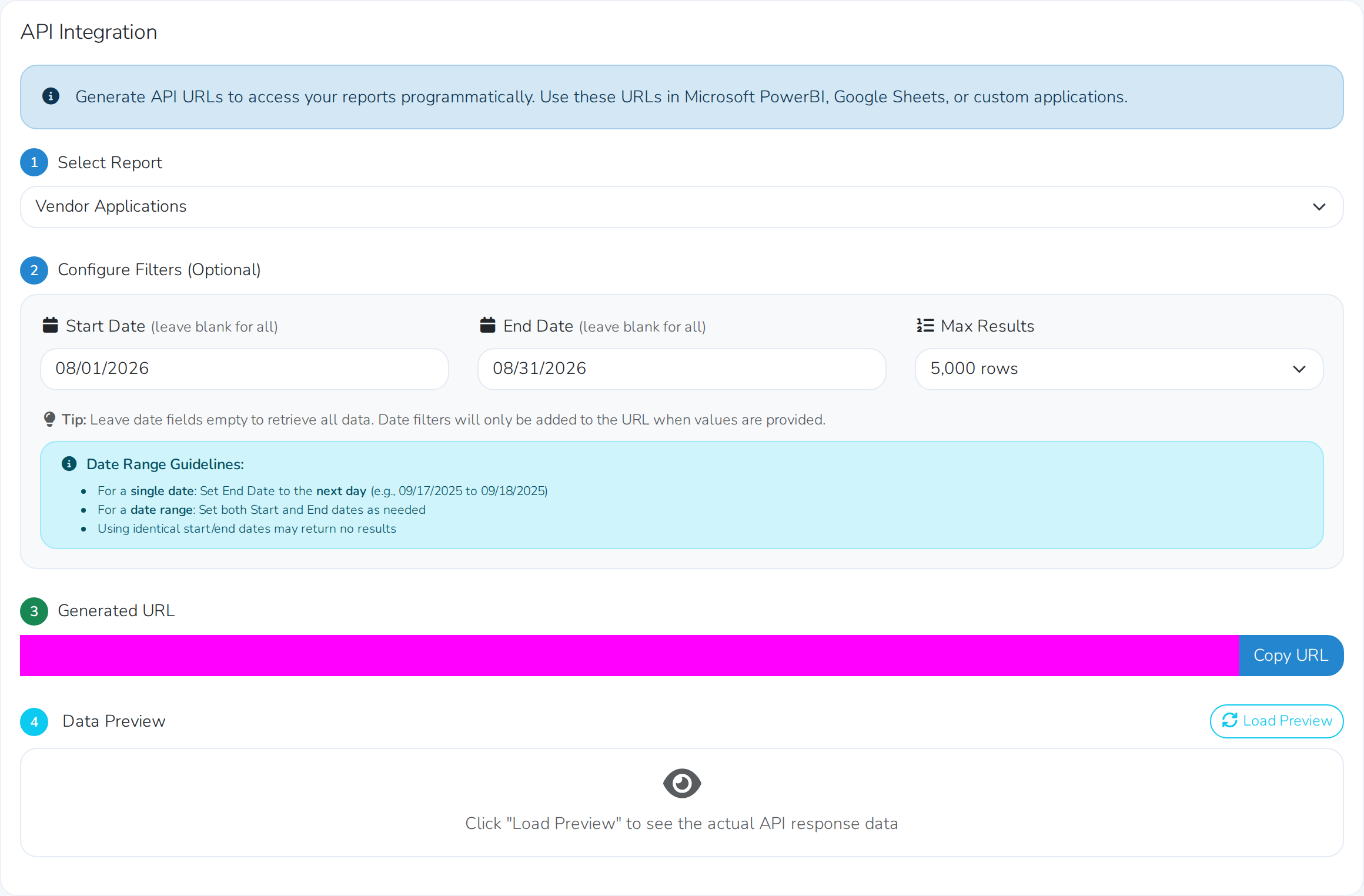
- Open Reports, then Integrations.
- Choose the report you want, such as new and complete vendor applications.
- Choose the date range you want covered.
- Choose how many rows to return, up to 5,000.
- Copy the link shown underneath.
Set up the Google Sheet
You need a free add-on called API Connector. Install it once, from
Extensions, then Add-ons, then Get add-ons, searching for
"API Connector".
- In your sheet, open Extensions, then API Connector, then Open.
- Choose to create a request.
- Paste your link into the request URL.
- Leave the destination sheet set to the current one.
- Click Run.
Your report lands in the sheet, one column per field. From there it is an
ordinary spreadsheet — sort it, chart it, or build on it however you like.
API Connector is not ours
It is a third-party add-on from the Google Workspace Marketplace, with its
own terms and its own limits on how often it will fetch.
Treat the link as private
The link opens your report data without asking anyone to sign in, so treat
it the way you would a password. Do not post it or share it outside the
people who should see those numbers.