


When you charge vendors approval fees, you may want to collect their payment information upfront — during the application — so you can automatically charge them when they're approved. This guide explains the two payment collection settings found on the Fees tab of your application editor.
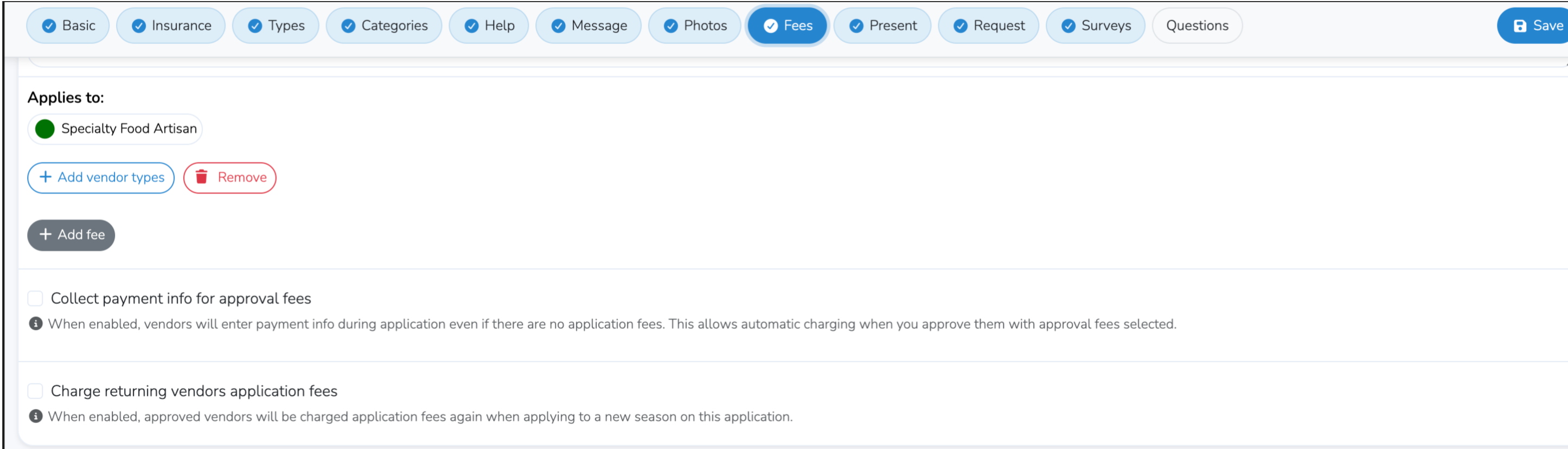
Collect Payment Info for Approval Fees
What it does: When enabled, vendors will be asked to enter their credit card information during the application process — even if there are no application fees to pay at that time.
Why use it: If your market charges approval fees (fees that are billed when a vendor is approved rather than when they apply), enabling this setting lets you capture the vendor's payment method upfront. Then, when you approve the vendor, the system will automatically charge their saved payment method for any approval fees associated with their vendor type.
When to enable it:
- You charge approval/acceptance fees and want vendors to be auto-charged at approval time
- You want to reduce the manual work of chasing vendors for payment after approval
When to leave it disabled:
- You don't charge approval fees
- You prefer to send invoices manually after approving vendors
- You already charge application fees (vendors will enter payment info for those regardless)
Note: If your application already has application fees configured (fees charged at the time of submission), vendors will be prompted to enter payment info regardless of this setting. This setting only matters when there are no application fees but you still want to capture a card for later approval charges.
Charge Returning Vendors Application Fees
What it does: When enabled, vendors who have already been approved to your market in a previous season will be charged application fees again when they apply to a new season on the same application.
Why use it: By default, returning vendors applying to a new season on a shared application are not charged application fees again. Enable this if you want all vendors — new and returning — to pay application fees every season.
When to enable it:
- You want to charge application fees for every season, even for returning vendors
- Your fee structure treats each season as a fresh application
When to leave it disabled:
- You only want to charge application fees once (the first time a vendor applies)
- You want returning vendors to have a streamlined reapplication experience
How to Configure These Settings
- Go to your Market Dashboard
- Navigate to Vendors → Applications
- Click Edit on the application you want to configure
- Select the Fees tab
- Check or uncheck the desired settings
- Click Save
Frequently Asked Questions
Q: I enabled "Collect payment info for approval fees" but vendors aren't seeing a payment form. Why?
A: Make sure you have approval fees configured for the relevant vendor types. If there are no approval fees set up, there's nothing to collect payment for and the payment form won't appear. Add fees using the + Add fee button on the Fees tab and make sure they are assigned to the correct vendor types.
Q: Will vendors be charged immediately when they apply?
A: No. The "Collect payment info for approval fees" setting only captures the vendor's payment method. The actual charge happens when you approve the vendor. Application fees (if any) are charged at submission time as usual.
Q: What happens if a vendor's card is declined at approval time?
A: If the auto-charge fails, an invoice will still be created for the vendor. You can then contact the vendor to update their payment method and pay the invoice manually.
Q: Can I use a coupon with approval fees?
A: Yes. If you have coupons configured, vendors can apply a coupon code during the application process that will discount their approval fees when they are charged at approval time.